Models change. People leave. The company brain is where knowledge and value compound.
For the past nine months, I have spent most of my time building agents inside real companies. I stopped making content for a while because the work became more interesting than talking about it.
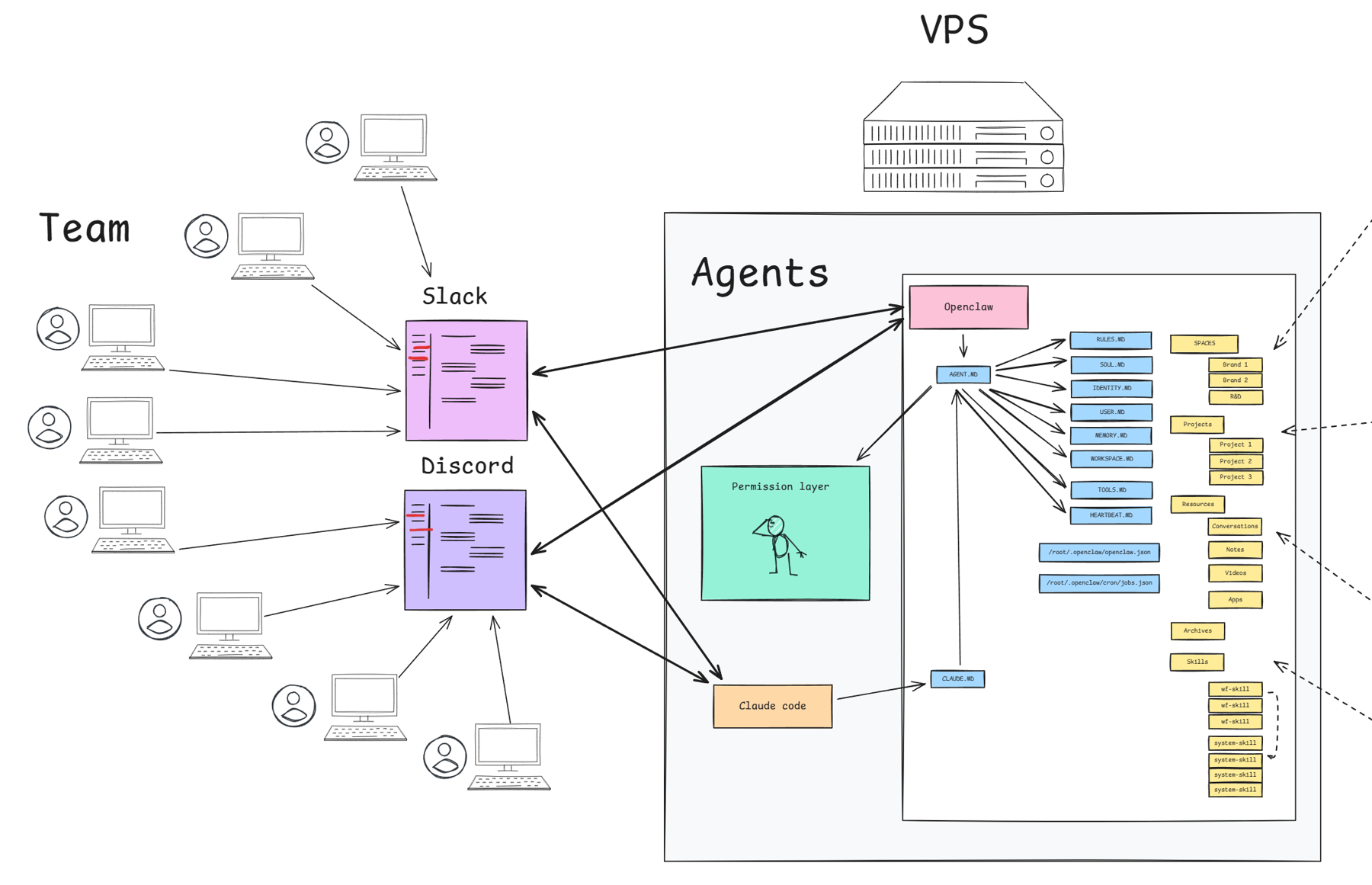
The largest system I run is used every day by a team of 40 to 50 people. They talk to one agent through Slack and Discord. It knows how the company works, it can reach around 55 external tools, and it keeps learning from the people using it.
I call this a company brain.
In this article, I am going to take the system apart and show you what each piece does. You will see where the agent lives, how 50 people talk to it, how the workspace is organized, how skills preserve what people learn, how 55 tools and a knowledge graph fit in, and how I keep access under control. You should finish with enough of the architecture to sketch a first version for your own company.
That name probably makes it sound more complicated than it is. There is no giant custom AI model hiding behind it. The system is built from pieces anyone can get: a server, an agent, Slack or Discord, a workspace, a permission layer, and a growing collection of skills.
The difficult part is deciding how those pieces work together.
The main thing I have learned is that the agent itself matters far less than people think. I can replace OpenClaw with Claude Code or Codex. I can change the model. I can run several agents at the same time.
The valuable part stays where it is.
The workspace is the asset. It contains the knowledge, the operating rules, the skills, the tools, and the history of what the company has learned.
1. Start with a computer that never sleeps
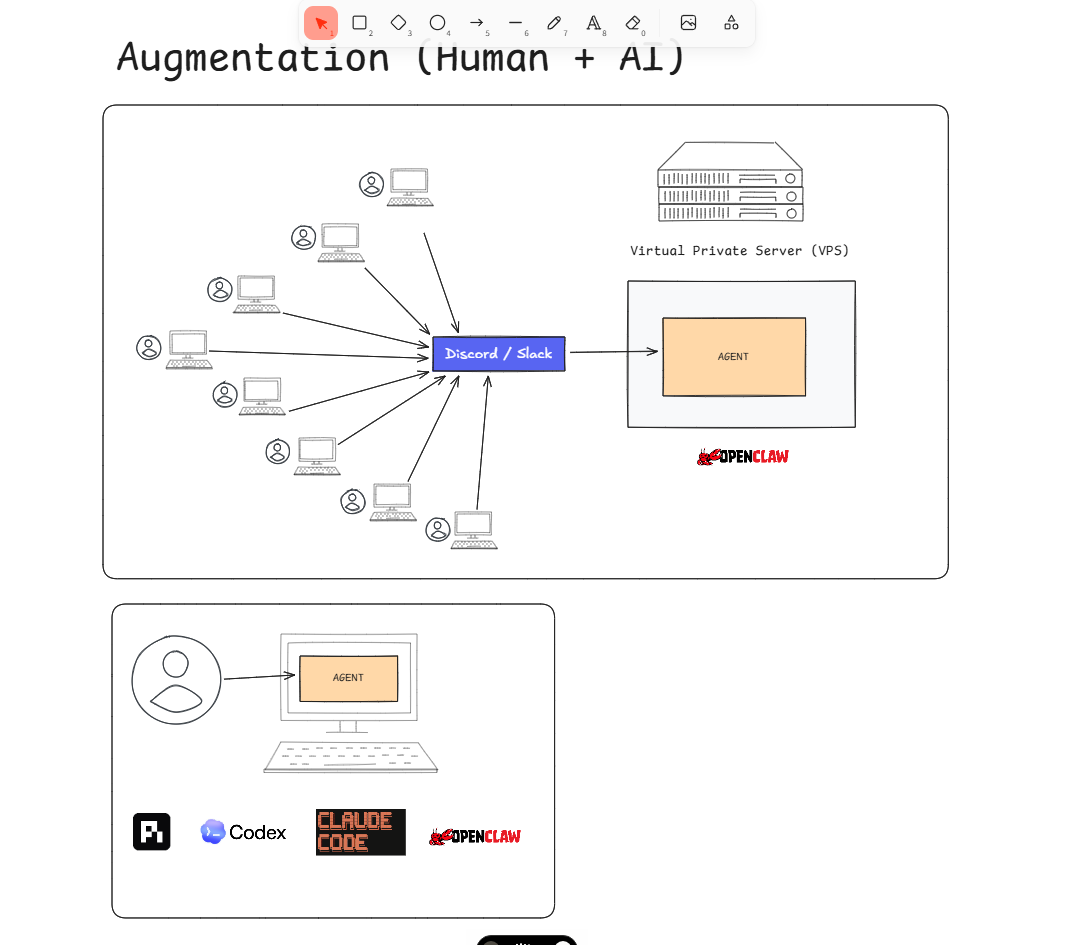
An agent needs somewhere to live. For an individual, that can be a laptop. For a company, it needs to be available when anyone on the team asks for it.
I run mine on a VPS, which is simply a computer in a data center that stays on all the time. You could keep a large computer in the office, but that adds maintenance and another physical point of failure. A VPS is easier today.
Several agents can live on the same server. More importantly, they can share the same workspace.
The team also needs a door into the system. I use Slack and Discord because the company is already there. Nobody should have to open a special AI application, learn a new interface, or remember where the correct chatbot lives.
They write a message where they already work. The agent answers there.
Slack makes sense because most companies already use it. Discord is unusually good for agents because it is modular. Channels create separate conversations with separate context, while the whole server can still connect to the same workspace.
Microsoft Teams, Matrix, or another communication platform could do the same job. The principle is to bring the agent to the team.
2. The workspace decides what the agent knows
When an agent starts a conversation, it reads a small set of files first. One file tells it who it is and points it toward the rest: its rules, information about the user, how the workspace is organized, and how it should operate.
From there, the agent follows the information it needs for the request.
If someone asks about a dashboard project, it reads that project. The project might point toward a brand space, a relevant note, and a skill. The skill might tell it to use Shopify and PostHog. The agent does not need the whole company loaded into every conversation. It needs a reliable path to the right information.
This is progressive disclosure. I keep coming back to the same question when I build these systems: what information will enter the agent, and in what order, when this person asks for this task?
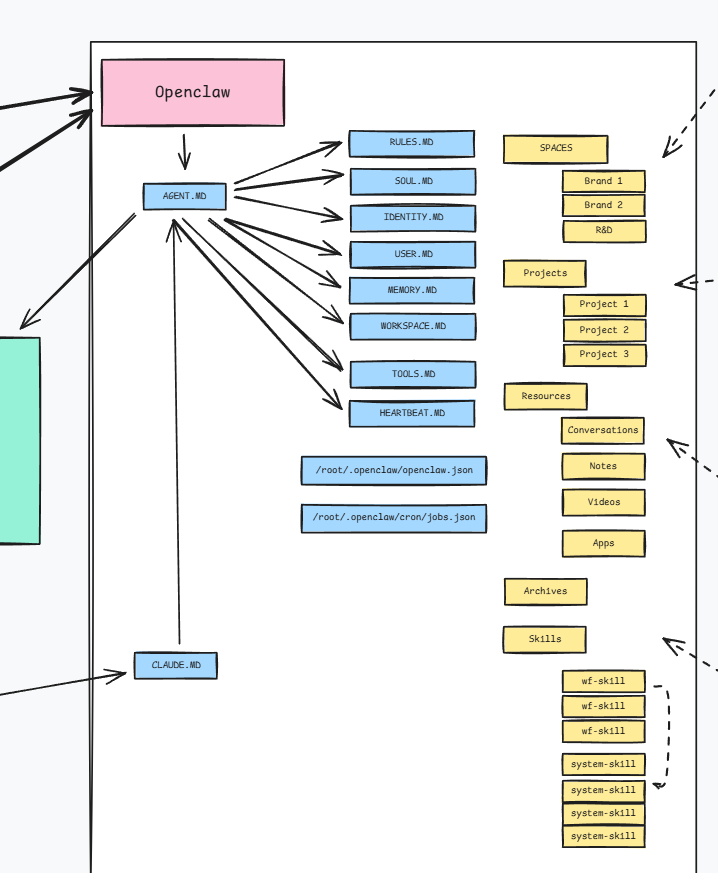
My folder structure comes from the second brain systems I used years ago. Spaces hold things that continue, such as a brand or a business. Projects have a beginning and an end. Resources are references that several projects might need. Archives hold completed work. Skills contain the ways the company knows how to do things.
You can organize the folders differently. What matters is that the agent can understand the structure and follow it without guessing.
3. Skills are how the company keeps what people learn
Skills are the closest thing the system has to company SOPs, although they can do more than a normal SOP.
Imagine someone on the marketing team wants the agent to produce a certain report. They ask for it. The first result is bad. They correct the agent, try again, add missing context, and eventually get something useful.
That work should not disappear inside one conversation.
The person can turn the successful process into a skill. The next time the task comes up, the agent already knows the sequence, the tools, the expected output, and the mistakes to avoid. If the skill finds a better way to work, it can record that learning for the next run.
This is where the company starts compounding. One person figures something out, and everybody using the agent gains access to it.
If that person leaves, the knowledge does not leave with them. A new employee can ask whether the company knows how to do the task, and the agent can answer with the process it was taught.
People still matter. The agent does not magically create good judgment. It gives the company a place to keep the judgment people have already developed.
4. The same company brain can use different agents
I currently run my main agent and Claude Code against the same workspace. There is a simple way to make Claude Code read the same starting file as the main agent. It wakes up with access to the same knowledge, tools, and skills.
I can also give Claude Code its own identity while pointing it toward the same company files. Codex can be connected in the same way. The exact setup is a design choice.
This is why I do not spend much time debating which harness is best. I use OpenClaw because it gave me the pieces I needed to run an agent continuously and connect it to the rest of the company. Another harness might be better at a specific task next month. Changing it is still easy compared with rebuilding the knowledge underneath it.
I also do not see much value in creating ten agents with job titles because a diagram looks impressive. One good agent with clear skills can do a lot. As models improve, I expect that to become even more true.
There are good reasons to run several agents. They can have different permissions, models, or operating modes. They can work on separate servers. They can test new setups without disturbing the main agent. They still become useful by connecting to the company workspace.
5. Tools turn knowledge into action
The company brain I show in the video is connected to around 55 tools.
It can search the web, collect research, read analytics, work with spreadsheets, inspect Meta and Google Ads, query Shopify, use Klaviyo and Gorgias, look at supply chain and finance data, generate creative assets, and access the infrastructure where other systems run.
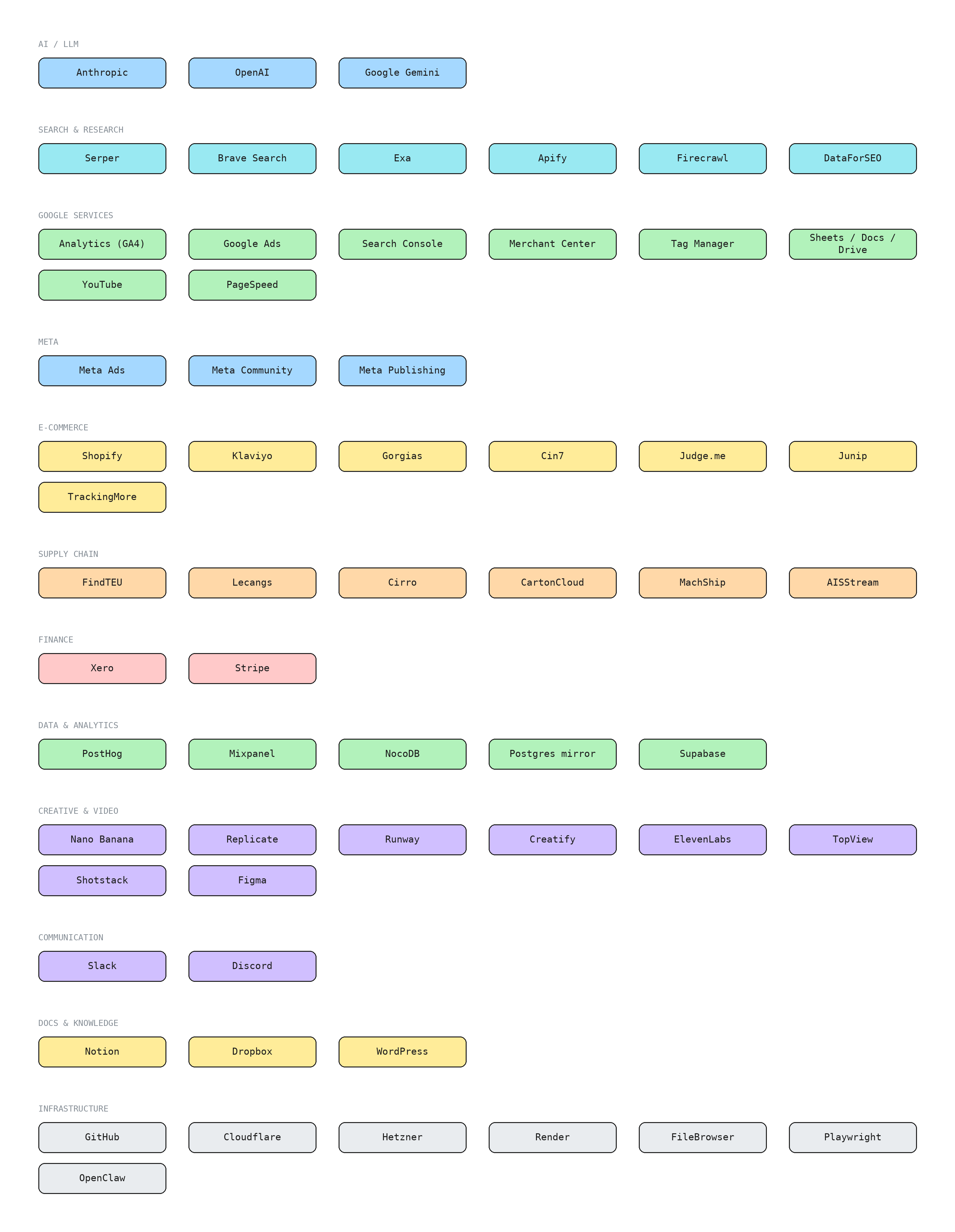
The person asking for help in Slack does not need to understand those connections. They ask the agent for an outcome. The agent finds the right project, follows the relevant skill, uses the necessary tools, and returns the result.
This changes what adoption looks like inside a company. A marketer does not need to learn every API. A founder does not need to assemble five exports before asking a business question. The complexity stays behind the conversation.
It also creates a real security problem, which I will get to shortly.
6. The knowledge graph gives the agent a map
Folders worked well until the amount of marketing knowledge became too large.
One company can have several brands. Each brand has products. Each product has selling propositions, marketing angles, personas, reviews, and customer evidence. When all of that is spread across folders, I cannot guarantee that the agent will connect the right persona to the right angle every time.
The knowledge graph gives it a map.
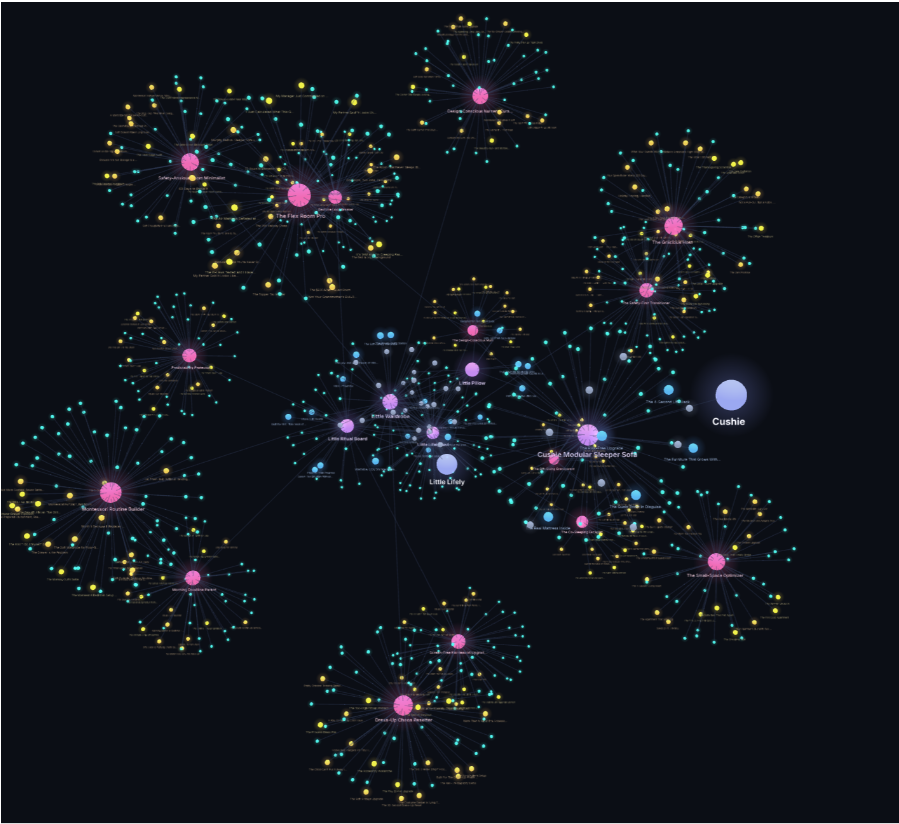
A brand connects to its products. A product connects to its selling propositions. Those connect to angles, personas, and the evidence supporting them. The agent can move through those relationships instead of searching folders and hoping it finds the right note.
My current version runs on Supabase because it was fast to build and easy to manage. A normal Postgres database on a private server could hold the same structure.
This part is recent. It exists, and the visualization looks good, but I have not tested it long enough to tell you it is the final answer. I will make a separate video once it has earned that confidence.
7. Permissions become unavoidable
At first, a company brain is easy to control. The founders use it. Then a few executives join. The number of connected tools is still small, and everyone can see everything.
Then executives invite their teams. Those teams want to include contractors. Meanwhile, the agent has gained write access to Shopify, Meta, Google, and the rest of the company stack.
At that point, one prompt can do much more than answer a question.
I built a permission layer that stores each person’s Slack and Discord identity, their role in the company, and the tools they can read from or write to. The agent checks who is asking before it uses a protected tool. If the person does not have access, it refuses and asks for approval from someone who does.
The agent has refused requests plenty of times. That is useful, but I would never describe it as a guarantee. Agents are probabilistic. A permission instruction reduces risk. It does not make the system impossible to manipulate.
Every new tool starts read only. Write access is earned for each person and each tool.
A founder still has to make a risk and reward decision. The risk is real. The value of giving a whole team access to these capabilities is also real. In the systems I run today, the reward has been much higher than the problems created.
8. The annoying problems are part of the system
The impressive diagram is the easy part.
Token use can become expensive quickly. Disks fill up. Memory problems crash agents. Files become messy. Knowledge gets duplicated. A company brain needs maintenance, cleanup, monitoring, and regular knowledge harvesting.
Most of these are normal engineering problems. They have solutions once you know to expect them.
Teaching people has been harder.
Every person approaches an agent differently. Some understand immediately how to give it context and correct it. Others treat it like Google or expect it to read their mind. Getting a real team to use the system well takes individual teaching.
It is also one of the most rewarding parts. People who did not consider themselves technical start building their own processes. They improve a skill, connect an idea to another team’s work, or find a use I did not plan.
The company brain works because people teach it. Then it helps the next person start further ahead.
9. The workspace should eventually live on its own
The current systems began with the workspace living beside one main agent. That worked, but it made the company knowledge look attached to that agent.
I am moving toward a more modular structure. The company workspace lives separately. Agents connect to it through the permission layer.
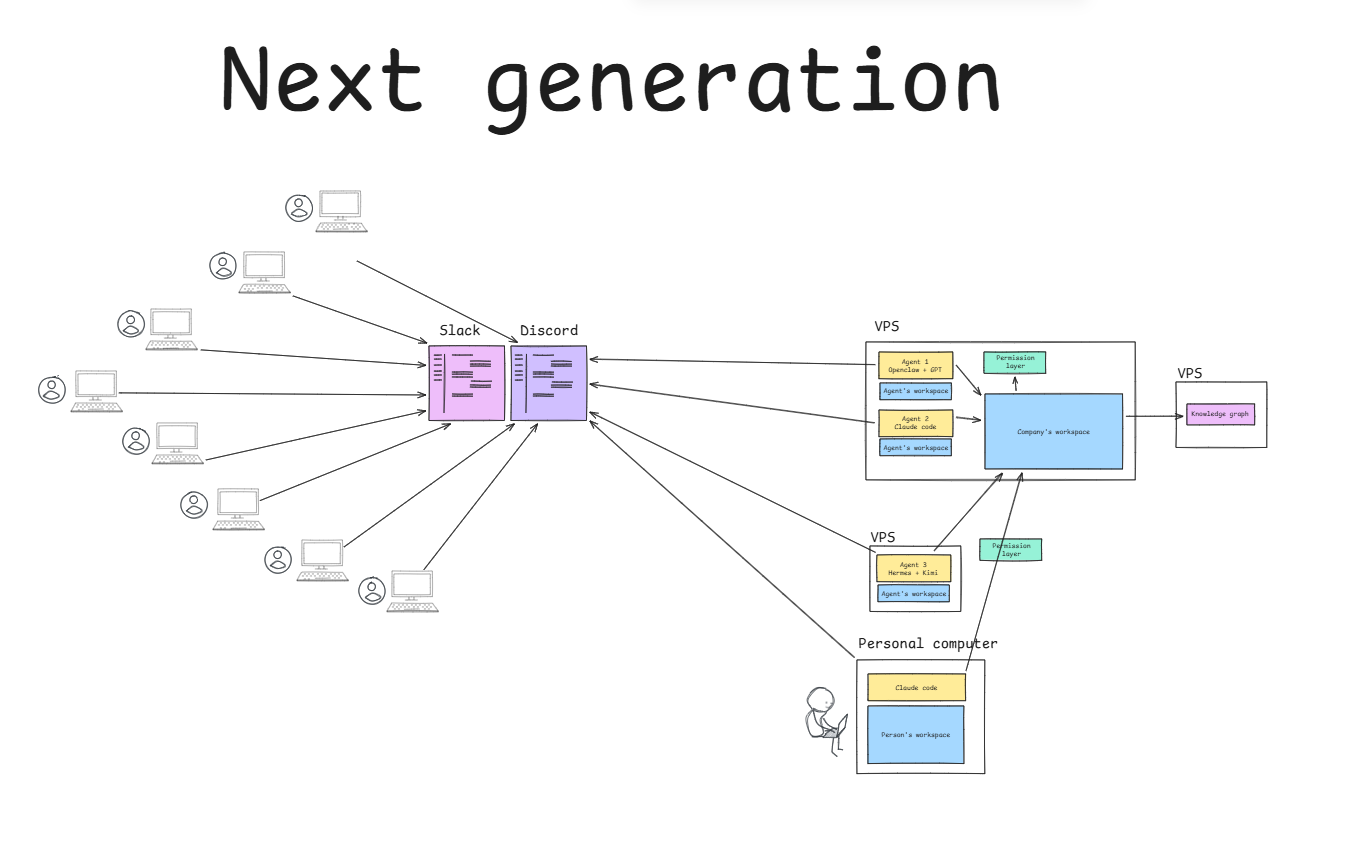
The nontechnical team can keep talking to the shared agent in Slack. An AI native employee can connect their own Codex setup to the same company workspace, using their personal tools and skills while receiving only the company access they are allowed to have.
Another agent can run on a different server. A local model can be used if it fits the task. A stronger model can be used when the task requires it. None of those choices should move the company’s knowledge.
That is the company brain I am trying to build: a central workspace that keeps gaining information, skills, and useful connections while the people, models, and agents around it change.
You need a communication platform, a model that fits the task, an agent harness, somewhere to host it, and a workspace the agent can understand. A knowledge graph may become necessary as the company grows. Permissions definitely will.
The tools will keep changing. The company’s ability to structure what it knows and make that knowledge usable is what compounds.
Watch the complete video walkthrough: This is how companies will actually use Agents.
The architecture board is available as a free editable Excalidraw file: get it here.
I also opened a small Discord for people building systems like this: AI System Thinkers.
Designing and deploying these systems inside companies is the work I do. If you are thinking about one for your company, start here.